09 July 2026
Restaurant POS Software
Best POS Software for Cafes & Small Restaurants in India (2026)
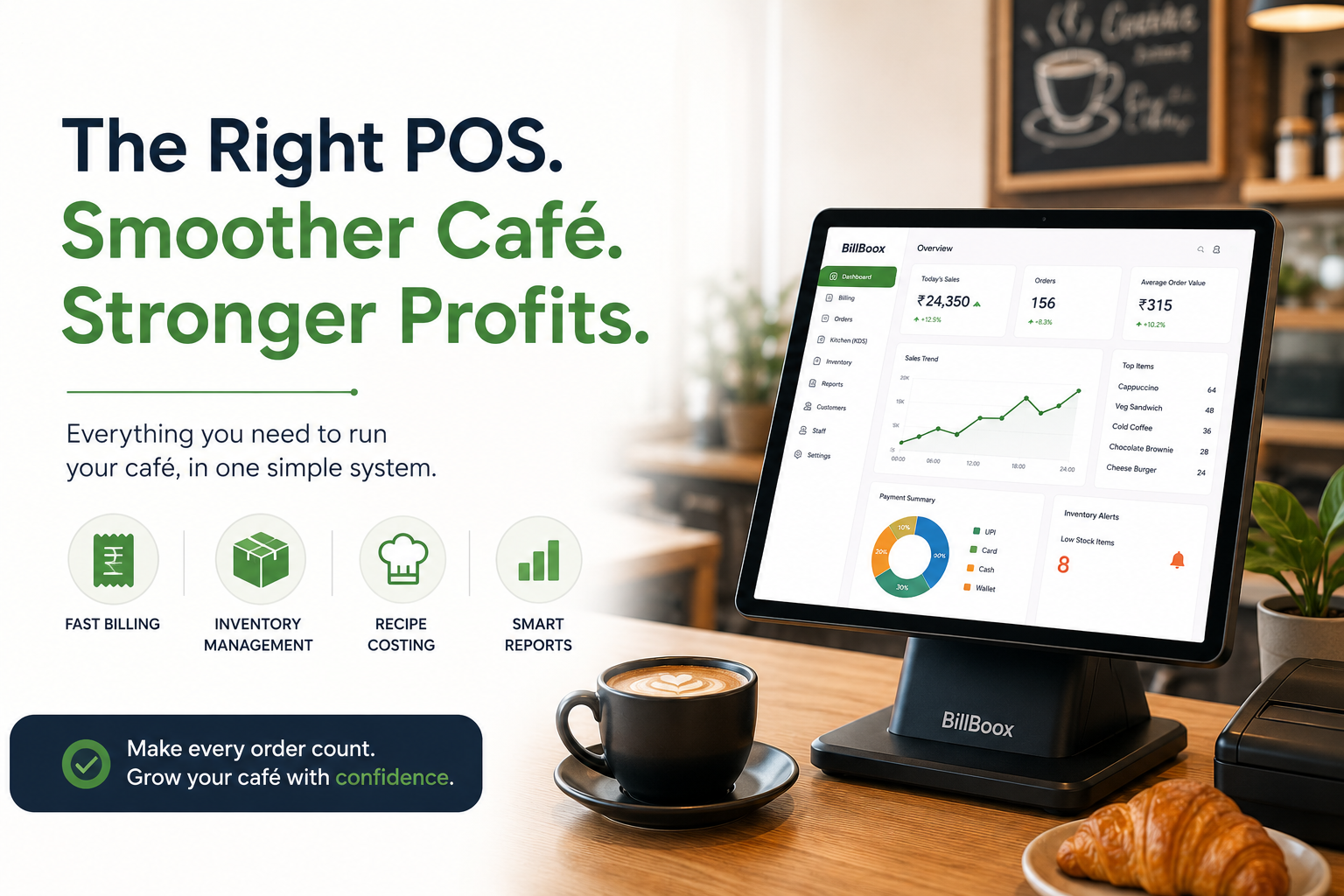
Best POS Software for Cafes & Small Restaurants in India (2026)
Running a café or small restaurant today is about much more than serving great food and coffee. Customers expect fast billing, multiple payment options, quick service, digital receipts, and a seamless dining experience. At the same time, restaurant owners need accurate inventory tracking, better control over food costs, and clear visibility into daily profits.
Trying to manage all of this manually or with basic billing software - often leads to mistakes, wasted time, and lost revenue.
That's why more cafés and small restaurants are switching to restaurant POS software that helps manage daily operations from a single platform.
But with so many options available, how do you choose the right one?
This guide explains everything you need to know before investing in a POS software for your café or small restaurant, including the features that matter most, common mistakes to avoid, pricing factors, and how the right POS can help you improve efficiency and profitability.
Whether you're opening your first coffee shop, running a bakery, managing a quick-service restaurant (QSR), or expanding to multiple outlets, this guide will help you make an informed decision.
What Is a Restaurant POS Software?
A Restaurant Point of Sale (POS) software is a complete management system that goes beyond billing. It connects different parts of your restaurant - billing, kitchen, inventory, staff, reports, and customer orders - into one streamlined workflow.
For example, when a customer places an order:
- The bill is generated instantly.
- The order is sent directly to the kitchen.
- Ingredients used in the recipe are deducted from inventory.
- Sales reports are updated automatically.
- The owner can monitor performance in real time.
Instead of relying on multiple registers, spreadsheets, and manual calculations, a modern POS automates these tasks, saving time and reducing errors.
Why Every Café Needs a Modern POS Software
Many café owners believe that a POS is only necessary for large restaurant chains. In reality, small businesses often benefit the most because they operate with limited staff and tighter profit margins.
Here are some common challenges cafés face without a proper POS system:
1. Slow Billing During Peak Hours
Morning rushes and weekend evenings can quickly lead to long queues. Even a small delay in billing affects customer satisfaction and reduces table turnover.
2. Inventory Doesn't Match Actual Stock
If you've ever found that your coffee beans, milk, syrups, or bakery ingredients disappear faster than expected, you're not alone. Manual stock tracking often results in mismatched inventory, making it difficult to identify wastage or pilferage.
3. Rising Food Costs
Without recipe-based inventory management, it's hard to know the actual cost of preparing each menu item. Small differences in portion sizes can significantly reduce profit margins over time.
4. Limited Visibility Into Business Performance
Knowing your total sales isn't enough. Successful café owners also track:
- Best-selling menu items
- Peak business hours
- Average order value
- Staff performance
- Payment method trends
- Inventory consumption
- Gross profit
A restaurant POS software brings all of this information together, helping you make better business decisions.
Signs It's Time to Upgrade Your Billing System
If any of these situations sound familiar, your business may have outgrown a traditional billing setup:
- Billing takes too long during busy hours.
- Stock records rarely match actual inventory.
- You don't know which menu items are the most profitable.
- Recipe costs are calculated manually or not at all.
- Orders are still communicated verbally or on paper.
- You spend hours preparing sales reports.
- Managing multiple outlets feels difficult.
- You can't monitor your business when you're away.
A modern POS software solves these problems by automating repetitive tasks and giving you complete visibility into your operations.
What Makes the Best POS Software for Cafés?
Not all POS systems are built for the restaurant industry. Some are adapted from retail software, while others are designed specifically for food businesses.
When evaluating a POS solution, look for these essential features:
1. Fast Billing
Customers appreciate quick service, especially during peak hours. A good POS should generate GST-compliant bills within seconds while supporting UPI, cards, cash, split payments, and discounts.
2. Inventory Management
Inventory is one of the biggest operational costs for cafés and restaurants.
Your POS should automatically update stock whenever an item is sold and alert you before ingredients run out.
Look for:
- Real-time stock updates
- Low-stock alerts
- Purchase management
- Waste tracking
- Stock adjustments
3. Recipe Costing
Recipe costing helps calculate the exact cost of every menu item based on ingredient quantities.
This allows you to:
- Set profitable menu prices
- Reduce food wastage
- Identify expensive dishes
- Maintain consistent portion sizes
Many small restaurants overlook this feature, leading to hidden profit losses.
4. Kitchen Display System (KDS)
Instead of handwritten order slips, a Kitchen Display System (KDS) displays orders digitally in the kitchen.
Benefits include:
- Faster preparation
- Fewer communication errors
- Better order tracking
- Improved kitchen efficiency
- Reduced paper usage
5. Owner Dashboard
Whether you're at the restaurant or away, a cloud-based dashboard allows you to monitor:
- Live sales
- Orders
- Inventory
- Staff activity
- Business performance
- Outlet-wise reports
This is particularly useful for owners managing multiple locations.
6. WhatsApp Bill Sharing
Many customers prefer digital receipts over printed copies.
A POS that supports WhatsApp bill sharing improves convenience, reduces paper usage, and creates a better customer experience.
7. Detailed Business Reports
Good decisions require good data.
Your POS should provide reports such as:
- Daily sales
- Item-wise sales
- Category performance
- Payment summaries
- GST reports
- Inventory reports
- Profit analysis
These insights help you identify trends and improve profitability.
Why the Right POS Is an Investment-Not an Expense
Some restaurant owners focus only on the software price.
However, the right POS often pays for itself by:
- Reducing billing errors
- Preventing inventory losses
- Improving staff productivity
- Speeding up service
- Reducing food wastage
- Increasing repeat customers
Instead of asking, "How much does the software cost?", ask:
"How much money can this software help my restaurant save every month?"
That shift in perspective often leads to a better long-term decision.
How to Choose the Best POS Software for Your Café
Choosing a POS software is a long-term business decision. Switching systems later can be time-consuming, require staff retraining, and disrupt daily operations. That's why it's important to evaluate your options carefully before making a purchase.
Here are the key factors every café and small restaurant owner should consider.
1. Choose Restaurant-Specific POS Software
Some billing software is designed for retail stores and later adapted for restaurants. While they may handle billing, they often lack restaurant-specific features such as table management, recipe costing, kitchen workflows, and inventory linked to menu items.
A restaurant-focused POS is better equipped to handle the day-to-day operations of cafés, bakeries, QSRs, cloud kitchens, and dine-in restaurants.
2. Prioritize Ease of Use
Your staff should be able to learn the software quickly. During busy hours, every second matters.
Look for software with:
- Simple navigation
- Fast billing workflow
- Minimal training requirements
- Touch-friendly interface
- Easy menu management
Complicated software can slow down operations and increase billing mistakes.
3. Inventory Should Update Automatically
Inventory is one of the biggest hidden expenses in any café.
Without automatic stock deductions, you may experience:
- Unexpected stock shortages
- Over-ordering
- Food wastage
- Difficulty identifying losses
Choose a POS that updates inventory automatically whenever an item is billed. This helps maintain accurate stock levels and reduces manual work.
4. Recipe Costing Should Be Built In
Many cafés know their daily sales but don't know the actual profit on each item.
Recipe costing helps you understand:
- Ingredient cost per dish
- Gross profit per menu item
- Impact of supplier price changes
- Menu pricing decisions
For example, if the cost of coffee beans or dairy products increases, recipe costing allows you to see how it affects your margins before it becomes a larger issue.
5. Reporting Should Help You Make Decisions
A good POS doesn't just collect data-it helps you understand your business.
Useful reports include:
- Best-selling items
- Slow-moving menu items
- Hourly sales
- Category performance
- Payment summaries
- Tax reports
- Staff performance
- Inventory movement
- Purchase history
These reports can help you identify opportunities to improve operations and profitability.
6. Cloud Access Matters
As your business grows, you'll likely want to check sales and performance even when you're not at the restaurant.
Cloud-based POS software lets you monitor:
- Daily sales
- Outlet performance
- Inventory
- Staff activity
- Reports
from anywhere with an internet connection.
7. Reliable Customer Support Is Essential
Even the best software occasionally requires assistance.
Before choosing a provider, ask:
- What are the support hours?
- Is onboarding included?
- How quickly are issues resolved?
- Are software updates included?
- Is training available for new staff?
Responsive support can make a significant difference during busy business hours.
7 Common Mistakes Café Owners Make When Buying POS Software
Many businesses select software based only on price or recommendations. Here are some mistakes to avoid.
1. Buying the Cheapest Software
Lower upfront pricing may seem attractive, but missing features such as inventory management or recipe costing can lead to higher operational costs over time.
Focus on overall value rather than price alone.
2. Ignoring Inventory Management
Inventory affects profitability every day.
If your POS only creates bills and doesn't track stock usage, you'll still need manual processes to manage inventory.
3. Not Asking for a Live Demo
A brochure can't show you how software performs during a busy lunch rush.
Always request a live demo and evaluate how quickly common tasks-like billing, modifying orders, or applying discounts-can be completed.
4. Choosing Software That Can't Scale
If you plan to add more outlets in the future, ensure the software supports multi-outlet management and centralized reporting.
Migrating to a new system later can be costly and disruptive.
5. Overlooking Reporting Features
Sales totals alone aren't enough.
Actionable reports help you:
- Improve menu performance
- Reduce waste
- Optimize staffing
- Monitor growth
6. Forgetting About Staff Permissions
Different team members need different levels of access.
Role-based permissions and activity tracking help improve accountability and reduce operational risks.
7. Choosing Software That Doesn't Fit Your Workflow
Every restaurant operates differently.
Before purchasing, ask yourself:
- Does the software match how my café works?
- Will it simplify daily operations?
- Can my staff learn it quickly?
The best software is the one that supports your workflow-not the one with the longest feature list.
What a Modern Café POS Should Help You Achieve
The goal of a POS system isn't just to print bills.
It should help you:
- Serve customers faster.
- Reduce billing mistakes.
- Track inventory accurately.
- Minimize food wastage.
- Understand your profit margins.
- Improve staff productivity.
- Make informed business decisions.
When these areas improve together, your restaurant becomes easier to manage and better positioned for long-term growth.
Why BillBoox Was Built for Growing Cafés and Small Restaurants
At BillBoox, we've spoken with restaurant owners who shared a common challenge: they were using separate tools for billing, inventory, reporting, and kitchen management-or relying on manual processes that consumed valuable time.
That's why BillBoox brings these essential functions together in one platform.
With BillBoox, you can:
- Generate GST-compliant bills quickly.
- Manage dine-in and takeaway orders.
- Track inventory in real time.
- Calculate recipe costs.
- Send orders to the Kitchen Display System (KDS).
- Share bills with customers on WhatsApp.
- Monitor sales through the Owner Dashboard.
- Manage staff access and permissions.
- Access detailed business reports.
- Scale from a single café to multiple outlets.
Instead of spending time switching between different systems, you can focus on serving customers and growing your business.
Learn More About Managing Your Restaurant
If you're planning to modernize your restaurant, these resources may also help:
- Restaurant Inventory Management Guide – Learn how better stock control can reduce food wastage.
- Kitchen Display System (KDS): Benefits for Restaurants – Discover how digital kitchen workflows improve order accuracy.
- WhatsApp Billing for Restaurants – Explore how digital receipts enhance customer convenience.
- Restaurant POS Software Pricing Guide – Understand pricing models and choose the right plan for your business.
Add links to the corresponding BillBoox articles and feature pages that already exist on your website. Avoid linking only to the homepage-use relevant internal pages to strengthen topical authority.
Ready to See BillBoox in Action?
Choosing the right POS software is easier when you experience it firsthand.
Book a free BillBoox demo to see how billing, inventory, recipe costing, reporting, and kitchen management work together in one system.
Whether you're opening a new café or upgrading your existing setup, a live demonstration can help you determine whether BillBoox is the right fit for your business.
Frequently Asked Questions(FAQs)
1. What is the best POS software for a café?
The best POS software for a café should do much more than generate bills. It should help you manage inventory, calculate recipe costs, send orders to the kitchen, track staff performance, monitor sales, and provide detailed reports. Choosing a restaurant-specific POS software ensures your daily operations are easier to manage and your business is ready to grow.
2. Do small cafés really need POS software?
Yes. Even a small café can benefit from POS software. It reduces billing time, tracks inventory automatically, helps manage staff, provides business reports, and minimizes manual errors. As your business grows, having a proper POS system becomes even more valuable.
3. How much does restaurant POS software cost in India?
Pricing depends on the features you need, the number of outlets, and whether the software is cloud-based. Some providers charge monthly, while others offer annual subscription plans. Instead of choosing the cheapest option, compare the overall value, support, and features included.
4. Can POS software help reduce food wastage?
Yes. A restaurant POS with inventory management and recipe costing tracks ingredient usage automatically whenever a menu item is sold. This helps identify wastage, monitor stock levels, and make better purchasing decisions.
5. Is cloud-based POS software better than offline software?
Cloud-based POS software allows restaurant owners to monitor sales, inventory, and reports from anywhere. Many modern systems also support offline billing and synchronize data once the internet connection is restored, giving you the benefits of both reliability and remote access.
6. What features should a café POS software include?
A modern café POS should include:
- Fast GST billing
- Inventory management
- Recipe costing
- Kitchen Display System (KDS)
- WhatsApp bill sharing
- Staff management
- Owner dashboard
- Business reports
- Multi-payment support
- Cloud backup
7. Can I manage multiple café outlets with one POS?
Yes. Many cloud-based restaurant POS solutions allow you to manage multiple outlets from a single dashboard. You can compare outlet performance, monitor inventory, and access consolidated reports.
8. Does POS software support UPI payments?
Most modern POS software supports UPI, debit cards, credit cards, wallets, and cash payments, making checkout faster and more convenient for customers.
9. Is restaurant POS software difficult to learn?
No. A well-designed POS system should be easy to learn and use. Most restaurant staff can become comfortable with a simple interface after basic training.
10. Why is inventory management important for cafés?
Inventory often represents one of the largest operating costs for a café. Accurate inventory tracking helps prevent stock shortages, reduce food wastage, and improve profitability by ensuring ingredients are used efficiently.
About BillBoox
BillBoox is an all-in-one restaurant management platform built for cafés, restaurants, cloud kitchens, bakeries, QSRs, and food courts.
The platform combines:
- Fast GST Billing
- Inventory Management
- Recipe Costing
- Kitchen Display System (KDS)
- Captain Ordering App
- Purchase Management
- WhatsApp Bill Sharing
- Owner Dashboard
- Staff Management
- Business Reports
Whether you're opening your first café or expanding to multiple outlets, BillBoox is designed to simplify daily operations and help you make better business decisions.
Ready to Upgrade Your Café?
Choosing the right POS software isn't just about billing-it's about building a more efficient, profitable, and scalable business.
If you're looking for a restaurant POS that helps you:
- Serve customers faster
- Reduce billing mistakes
- Track inventory automatically
- Control food costs
- Monitor your business from anywhere
- Grow without switching software later
BillBoox is built to support those goals.
Book a Free Demo
See how BillBoox works with your restaurant's workflow before making a decision.
During the demo, you'll see:
- Fast billing
- Inventory management
- Recipe costing
- Kitchen Display System (KDS)
- WhatsApp bill sharing
- Owner Dashboard
- Reports and analytics
Our team can also answer your questions and suggest the right setup based on your restaurant type.
👉 Book a Free Demo today and explore how the platform can help simplify your daily operations.
Related Articles
Continue learning with these helpful resources from BillBoox:
- Restaurant Inventory Management Guide
- Restaurant POS Software Pricing in India
- Kitchen Display System (KDS): Complete Guide
- Restaurant Billing Software Guide
Disclaimer
This article is intended for informational purposes only. Features, pricing, integrations, and product availability may change over time. Readers should evaluate software based on their individual business requirements and verify the latest information before making a purchase decision.
Any third-party product names or trademarks mentioned are the property of their respective owners and are used only for identification where applicable.
About the Author
BillBoox Editorial Team
The BillBoox Editorial Team creates practical resources for restaurant owners across India. Our content focuses on restaurant technology, billing systems, inventory management, kitchen operations, and business growth, helping cafés and restaurants make informed decisions through clear, experience-based guidance.