02 January 2026
Restaurant Operations & Management
Kitchen Display System (KDS): Benefits, Features & How It Works for Restaurants (2026)
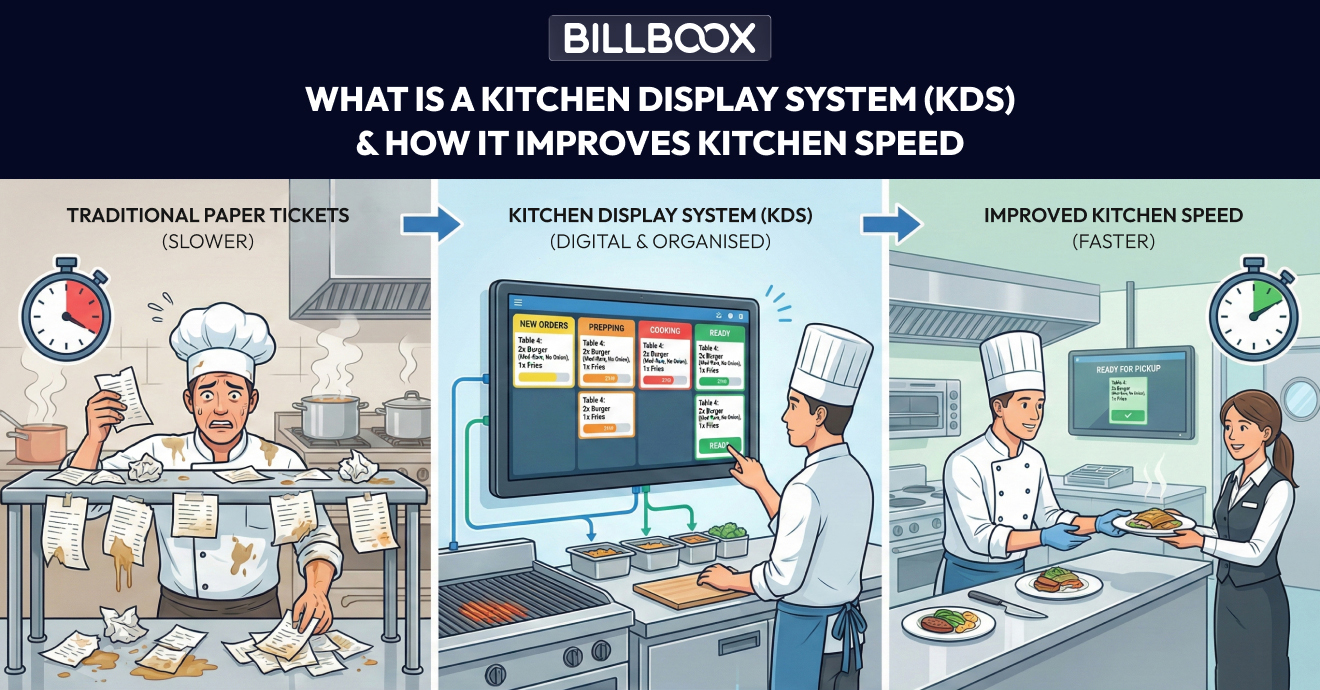
Managing orders efficiently in a busy restaurant kitchen is one of the biggest operational challenges. Paper tickets, verbal instructions, and manual coordination often lead to delays, mistakes, and food wastage.
A Kitchen Display System (KDS) solves this problem by digitizing kitchen operations and connecting the kitchen directly with the restaurant POS system.
In this guide, you’ll learn:
- What a kitchen display system (KDS) is
- How a KDS system works in restaurants
- Why restaurants are replacing paper tickets with KDS
- How KDS integrates with POS software
- Whether KDS is useful for Indian restaurants
| KDS Quick Overview | |
|---|---|
| Used for | Digital kitchen order management |
| Replaces | Paper tickets |
| Main benefit | Faster kitchen workflow |
| Works with | Restaurant POS |
| Best for | Restaurants, cafes, cloud kitchens |
What Is a Kitchen Display System (KDS)?
A Kitchen Display System (KDS) is a digital order management screen used in restaurants to display customer orders in real time. It replaces paper tickets and helps kitchens improve speed, accuracy, and coordination.
Instead of handling paper slips, chefs and kitchen staff see:
- Order details
- Item priority
- Preparation time
- Order status
This helps kitchens work faster, more accurately, and more efficiently.
What Is a KDS System in Restaurants?
A KDS system is the complete setup that includes:
- One or more kitchen display screens
- Software connected to the restaurant POS
- Order routing and status tracking
In restaurants, KDS systems are used to:
- Reduce order errors
- Improve kitchen coordination
- Speed up food preparation
- Track order completion time
Whether it’s dine-in, takeaway, or delivery, all orders flow into one centralized kitchen system.
How Does a Kitchen Display System Work?
A kitchen display system works seamlessly with your POS software. Here’s how the process looks in real life:
Step-by-Step KDS Workflow
- A customer places an order at the POS or Captain
- The order is instantly sent to the kitchen display screen
- Items are sorted by kitchen station (grill, tandoor, bar, etc.)
- Preparation timers start automatically
- Kitchen staff updates order status (preparing, ready)
- Completed orders sync back to the POS or Captain system
This real-time flow eliminates confusion and improves service speed.
Kitchen Display System vs Paper Tickets
Many restaurants still rely on paper tickets, but this method creates bottlenecks as order volume grows.
| Feature | Kitchen Display System | Paper Tickets |
|---|---|---|
| Order accuracy | High | Low |
| Speed | Faster | Slower |
| Order visibility | Real-time | Limited |
| Food wastage | Reduced | Higher |
| Reporting | Available | Not available |
| Scalability | Easy | Difficult |
A KDS system ensures smoother operations, especially during peak hours.
Why Indian Restaurants Need a Kitchen Display System
Indian restaurants operate in high-pressure environments with:
- Large menus
- High order volumes
- Dine-in + delivery orders together
- Staff dependency and language barriers
A kitchen display system helps Indian restaurants by:
- Clearly displaying orders without language confusion
- Managing high peak-hour loads
- Handling cloud kitchen and delivery orders efficiently
- Improving coordination between front-of-house and kitchen
For growing restaurants and cloud kitchens, KDS is no longer optional.
How KDS Works with Restaurant POS Software
A kitchen display system delivers maximum value when integrated with POS software.
When connected to a POS:
- Orders flow directly from billing to kitchen
- Manual errors are eliminated
- Preparation time is tracked
- Order data is stored for reporting
This integration also supports better inventory and cost control.
👉 Learn How Restaurant Inventory Management Works in POS Software
👉 Also read: How to Reduce Food Cost in Restaurant Using POS Inventory
Key Benefits of Using a Kitchen Display System
Restaurants using KDS experience:
- Faster order processing
- Fewer billing and kitchen errors
- Better kitchen coordination
- Reduced food wastage
- Improved customer satisfaction
- Clear performance tracking
These benefits directly impact profitability and service quality.
Is a Kitchen Display System Suitable for Small Restaurants?
Yes. Even small restaurants benefit from KDS because:
- It reduces staff dependency
- Improves order accuracy
- Makes operations more organized
As order volume grows, KDS helps small restaurants scale without chaos.
Frequently Asked Questions(FAQs)
1. What is a kitchen display system (KDS)?
A kitchen display system is a digital screen used in restaurant kitchens to display orders received from the POS system in real time, replacing traditional paper tickets.
2. Is a KDS system useful for small restaurants?
Yes. Small restaurants benefit from improved order accuracy, faster preparation, and smoother kitchen coordination.
3. Does a kitchen display system work without internet?
Most KDS systems work within the restaurant’s local network and continue operating during internet outages, syncing data once connectivity is restored.
4. Can a kitchen display system integrate with POS software?
Yes. A KDS system works best when integrated with restaurant POS software for real-time order flow, tracking, and reporting.
Final Thoughts: Is a Kitchen Display System Worth It?
If your restaurant struggles with:
- Order confusion
- Slow service
- Paper ticket errors
- Peak-hour pressure
Then a kitchen display system is a practical upgrade that improves efficiency, accuracy, and customer experience.
See how modern restaurants use KDS with POS software in real workflows.
tags :
Kitchen display system
Restaurant kds
Kitchen order display system
Pos with kds
Kds for restaurant